October 20, 2026
An app for queuing that guests do not install
TL;DR
An app for queuing keeps one walk-in line on a screen. Staff add a name, or the guest joins from a link. The guest sees their place. Someone messages them when it is their turn.
Waitlist is that queueing application for a restaurant host stand, and for a similar single counter. The free plan is one location, a digital waitlist, and manual WhatsApp, up to 50 parties a day. Pro is $30/month, or $24/month billed annually, and sends WhatsApp automatically. Limits are on pricing.
Start for free. No credit card.
It is the wrong product if you need numbered tickets, several service windows, a lobby TV, or a HIPAA checkbox. That job is a different queue management system.
The short answer
An app for queuing is the staff tool for one live line. It keeps the name, the party size, the place in line, and a message for when it is that guest's turn. The guest should not install a second app to hold the spot. Waitlist is that queueing application for a restaurant host stand, or for one similar counter.
The clipboard fails when two people write on it. Sarah was a four-top with a 25-minute quote, and now nobody can tell if she is next, outside, or gone. This page is the decision for that counter: what the software has to do, which kind of line it is, and whether the free plan survives one rush.
Lobby screens and ticket numbers are a different purchase. That comparison is on the queue management system software page.
What the queueing application has to do
The useful version is small.
A name, a phone number, and a party size go in at the counter, or the guest adds them from your link.
The list shows who is next.
The guest can open a page and see their place.
A message goes out when it is their turn. On Waitlist that message is WhatsApp. The free plan sends it manually. Pro sends it automatically.
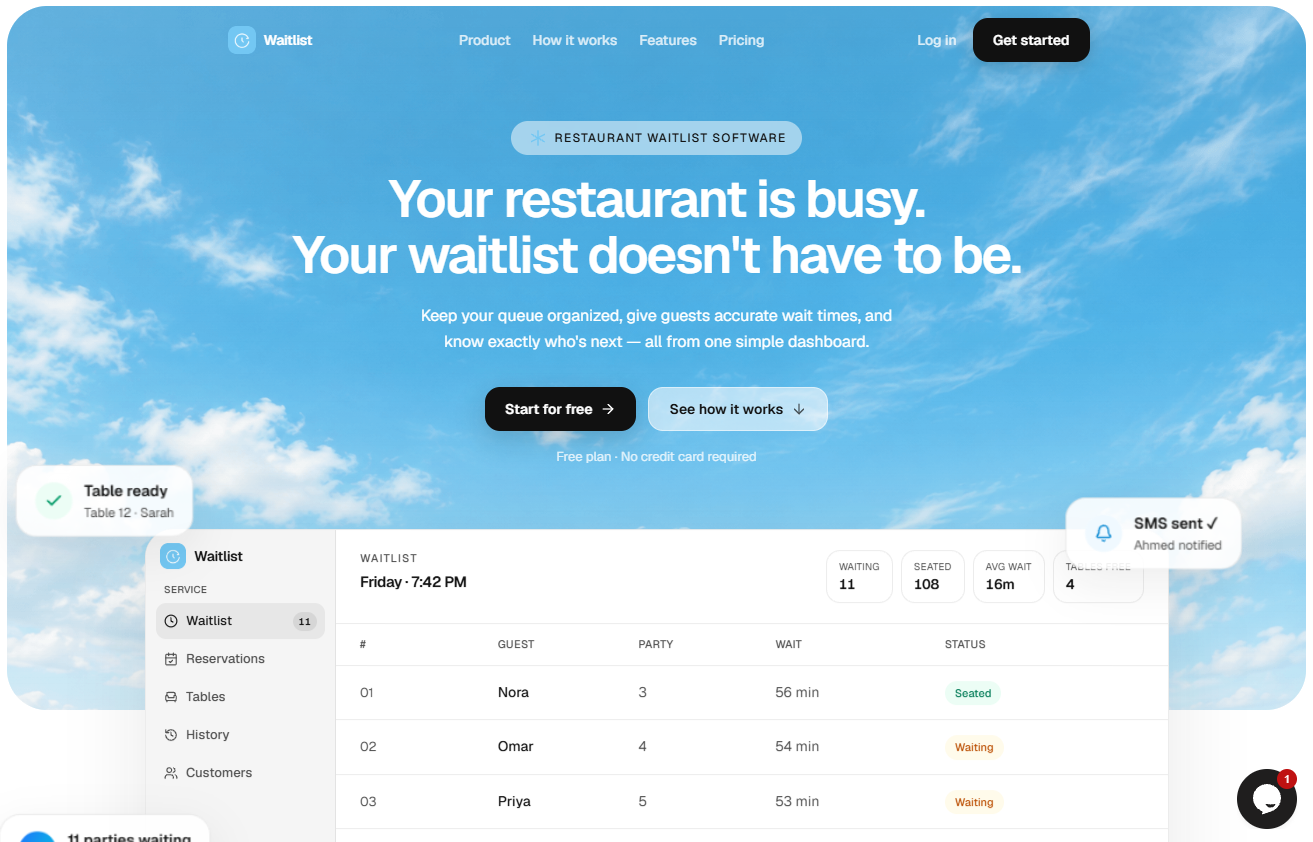
A quoted wait belongs on the same row. "About 25 minutes" is what the guest remembers. The screen should also show how long they have already waited, so the host can see a quote that has gone stale.
Skip tools that ask every guest to install an app from an app store. The staff app can live in the browser. The guest side should be a link.
Online queue
The guest can join from the doorway, the car, or down the block. That is an online queue. The counter still owns the order.
Waitlist does this with the restaurant's join link. You can also put that link in a QR code on the shelf. The guest opens it, joins the waitlist, and sees where they are. Staff still see the same list on the host screen.
If nobody is using the link, the host types the name. Both paths land on one list. You do not run a paper list for walk-ups and a second list for phones.
Virtual queuing
Virtual queuing is the method, not a second product. The guest keeps their place and leaves the doorway. They come back when the message says it is their turn.
That only works if the message arrives. A list the guest cannot see sends them back to the counter to ask how much longer. On the free plan, the host taps to send WhatsApp when the table or seat is ready. Pro sends the WhatsApp for you, including the guest's personal link and the ready message. Two-way SMS is marked Coming Soon on Pro, so do not buy Waitlist today for text replies.
Virtual queue system
A virtual queue system is the software around that method: the join link, the live place in line, the staff list, and the ready message. It is not a TV in the lobby and it is not a ticket printer.
Waitlist is a virtual queue system for one line. One location on the free plan. Unlimited locations on Pro, each with its own list, so Friday at one address does not mix with another site.
Virtual waitlist
Sarah, party of 4, is ahead of Omar, party of 2. You seat the party that fits the open table. You do not call "number 14" and hope a four-top takes a two-top. That name-and-size line is a virtual waitlist: a table, a chair, or an appointment, not a ticket.
Waitlist is built for that line. A dining room that needs the host-stand version of it should use restaurant waitlist software.
Digital queue system
A digital queue system is the clipboard moved onto a tablet. People may still be standing in front of you. The win is that two hosts see the same order, a name does not get skipped, and the wait is written down once.
Waitlist is that system in a browser. It runs on a phone, an iPad, or a laptop. No kiosk hardware. Guests without a phone can still be added with a name and a party size. You call them the old way when the seat is ready.
Digital queue management
Digital queue management is the job: decide who is next, tell them, and mark them seated, canceled, or gone. The software is only useful if the person at the counter will actually tap it during a rush.
A digital queue management system is the product that holds that job. For one walk-in line, the system needs the list, the guest page, and the ready message. It does not need six service windows.
On Pro, Waitlist adds the operating pieces around the line: reservations, table management, analytics, and priority support. Analytics covers walk-ins, average wait, peak times, and no-shows, and you can export a CSV. Those reports are not on the free plan.
When this is the right queuing app
Use Waitlist when all of these are true:
You have one line, not a bank of service windows.
You track a name and a group size.
Guests will open WhatsApp.
You can live with manual WhatsApp until you pass 50 parties a day, or you will pay for Pro.
Create the account and run one busy period on the free plan before you add reservations.
Do not use it for these jobs:
A clinic, a DMV-style counter, or any buyer who needs HIPAA written on the pricing page.
A lobby screen that calls ticket numbers.
Several lines at one address, such as "returns" and "pickup" as separate queues. Waitlist is one list per location. Areas and tables on Pro organize a dining room. They are not separate service lines.
SMS as the only channel. Two-way SMS is not live yet.
If you are comparing vendors for a service counter, start with the queue management system software comparison. The prices there were checked on public pages in October 2026.
What it costs
Free is $0. One location, a digital waitlist, manual WhatsApp, and up to 50 parties a day. No credit card. Details are on the pricing page.
Pro is $30/month, or $24/month billed annually. Pro removes the daily party cap and adds automatic WhatsApp, analytics, unlimited locations, reservations, table management, and priority support. There is no annual contract beyond the period you chose. You can cancel from Settings and stay on Free after the current period ends.
The limit to watch on Free is the day you pass 50 parties, or the night you are too busy to tap WhatsApp yourself. That is the point to move to Pro. It is not a reason to buy a lobby-TV platform.
Start with one rush
Open the free plan and add the parties you would have written on paper. Send the WhatsApp yourself for that service. If you passed 50 parties, or nobody had a free hand to tap send, move to Pro at $30/month, or $24/month billed annually. If the line is ticket numbers across several windows, leave this product and use the queue management comparison instead.
FAQ
What is an app for queuing?
It is software that keeps a live line for a table, a chair, or a service window. Staff see who is next. The guest can see their place and get a message when it is their turn. A clipboard is the same job on paper.
Do guests have to install a queueing application?
Not on Waitlist. Staff use the browser. Guests join from your link, or the host adds them and reaches them on WhatsApp. A consumer app from an app store is a worse fit for a one-time wait.
What is the difference between a virtual waitlist and a virtual queue system?
A virtual waitlist is names in order for a table or an appointment. A virtual queue system is the software that can hold that list, or a numbered ticket line people watch from their phone. Restaurants need the names and the party size. A service center often needs ticket numbers and more than one window.
What does a digital queue management system include?
For one walk-in line: the staff list, a way for the guest to join or be added, a page that shows their place, and a ready message. Waitlist puts the list and manual WhatsApp on Free. Automatic WhatsApp, reservations, tables, and analytics are on Pro.
How much does a queuing app cost?
Waitlist's free plan is $0 for one location and 50 parties a day. Pro is $30/month, or $24/month billed annually. Tools built for several service lines and a lobby screen usually cost more. Compare those on the current vendor page before you treat a blog price as final.